



Get news, updates, and insights delivered straight to your inbox.
Marketing Asset Management Software: How It Compares to Other MarTech Tools

Distributed marketing teams depend on more tools than ever — a CMS, cloud storage, design software, a CRM, and often a handful of point solutions layered on top. Each one plays a role. But when it comes to actually centralizing, customizing, and distributing branded assets to field teams, franchisees, and partners, most of these tools weren’t built for that job.
It’s a common assumption: if you already have a content management system, a shared drive, and design software, you should have digital assets covered. Not quite. Each of those tools solves a different problem, and none of them were designed to keep distributed teams working from the same approved, on-brand materials.
Marketing asset management software fills that specific gap. Here’s how it compares to the other MarTech tools already in your stack, and where it fits in a stronger marketing tech ecosystem.
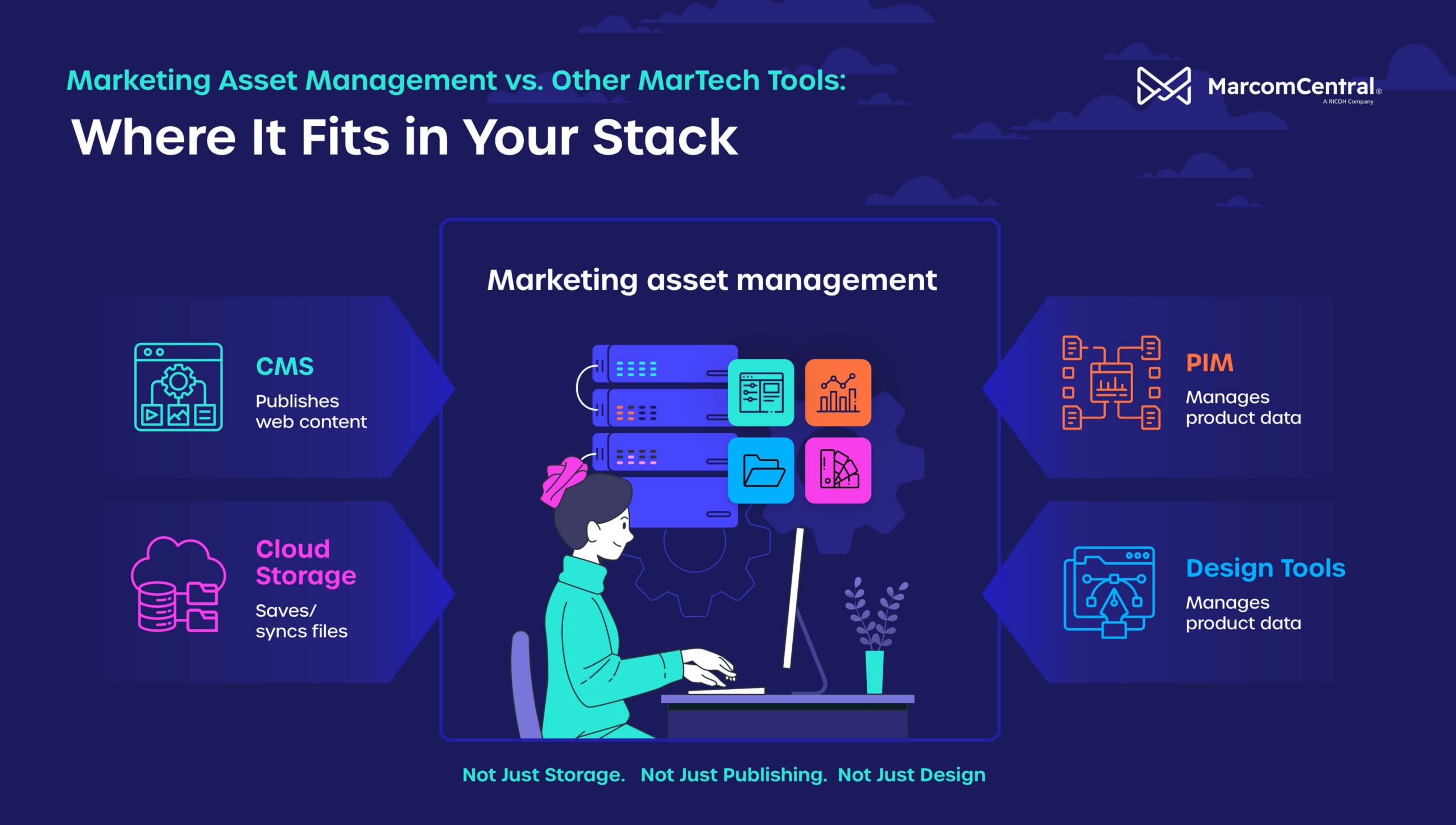
What Is Marketing Asset Management Software?
Before getting into marketing asset management vs. other MarTech tools, it’s helpful to understand precisely what marketing asset management (MAM) software does. MAM software enables you to organize, govern, distribute, and track marketing assets throughout their lifecycle.
These platforms don’t just store files. They provide a centralized environment where approved creative assets remain searchable, secure, and accessible to authorized users.
Marketing asset management software helps you keep track of all things marketing, including:
- Logos
- Product photos
- Sales collateral
- Social media graphics
- Videos
- Presentations
- Templates
- Campaign materials
Additionally, you can make sure your entire team is working from the latest version while also monitoring the content lifecycle. MAM software functions similarly to a digital asset management system, but it includes additional tools and features, such as granular metadata management.
Core Capabilities
Top marketing asset management software includes features and tools meant to make your life easier, such as:
- A centralized asset library
- Metadata and intelligent search
- Version control
- Access permissions
These capabilities bring a new level of brand governance to your content operations.
Marketing Asset Management vs. Content Management Systems (CMS)
A marketing asset management system and a CMS often work together, but they solve different challenges for your business. The two platforms are most effective when used in a complementary fashion.
What a Content Management System (CMS) Is Built For
A CMS manages digital experiences and how people interact with your brand. Platforms like these can help you publish and maintain your website content:
- WordPress
- Drupal
- Sitecore
- Canto
- Bynder
- Adobe Experience Manager
Having a user-friendly CMS helps to keep your site fresh and filled with engaging content.
Typical CMS capabilities include:
- Website publishing
- Content editing
- Page templates
- Navigation management
- SEO settings
- User authentication
- Web performance optimization
The primary function of a CMS is to deliver content to websites so your audience can enjoy it seamlessly.
Where the Two Overlap — and Where They Don’t
Both systems can be used to store images and documents, which is the major source of confusion. However, a CMS generally stores only the assets required for website content. It’s not built to govern all of your marketing assets.
Marketing asset management software, on the other hand, helps you track and manage the complete lifecycle of assets before they appear on your website. For instance, suppose that you upload an image of a product. With your MAM platform, you can track the progression and use of the image from the moment it is uploaded.
A CMS only comes into play when you display the image on your website. If you only rely on a CMS, you’ll have gaps in your content lifecycle.
Marketing Asset Management vs. Product Information Management (PIM)
Organizations that sell physical products often compare asset management platforms with product information management systems. Both have their place, as they serve different roles and solve different challenges.
Product Data vs. Brand Assets: Different Jobs
A product information management (PIM) platform focuses on structured product information. Typical PIM data includes:
- Product names
- SKUs
- Technical specs
- Pricing
- Dimensions
- Inventory attributes
- Product descriptions
- Channel-specific product information
Marketing asset management software addresses how creative assets are associated with those products. These include:
- Lifestyle photography
- Product videos
- Packaging files
- Logos
- Brand guidelines
- Promotional graphics
- Campaign materials
- Sales sheets
Think of PIM as managing product facts, while marketing asset management software manages brand storytelling. Businesses that don’t deal in physical products need a marketing asset management solution. Companies that sell tangible goods need both.
When Teams Need Both
Many manufacturers, retailers, and e-commerce organizations benefit from both systems working together. Here’s what that looks like in action:
- PIM manages product specs
- Asset management software stores approved marketing imagery
- E-commerce platforms retrieve both datasets automatically
- Marketing teams maintain governance without duplicating work
An integrated technology ecosystem will help you cover all the bases while providing a smoother experience for your team. However, you need your data organized in a way that makes it easy to find and tap into.
Marketing Asset Management vs. Cloud Storage (Dropbox, Shared Drives)
Many organizations begin by storing marketing files in cloud storage platforms like Dropbox, Google Drive, Microsoft OneDrive, or shared network folders. These solutions make it easy and convenient, but they are not designed to support the marketing operations of an entire enterprise.
While there’s nothing wrong with using a cloud storage solution, especially if your business is smaller or mid-sized, you can’t ask too much of these tools. That’s where you run into problems and add unnecessary friction to your content workflows. Cloud storage tools don’t have the governance and monitoring capabilities you need to track the lifecycle of content or support decentralized teams.
Why Storage Isn’t Governance
Cloud storage focuses on saving and synchronizing files across devices. It allows users to upload documents, create folders, and share links with colleagues. Small teams may find these capabilities adequate, but as your business grows, simple storage tools often create more problems than they solve.
Unlike marketing asset management software, cloud storage platforms generally lack these key features:
- Advanced metadata management
- Automated asset tagging
- Brand governance controls
- Approval workflows
- Rights management
- Comprehensive audit trails
- Marketing-specific search capabilities
As a result, your marketing team will waste valuable time searching for files and determining which version they should be using.
What Breaks Down at Scale Without Metadata & Permissions
Marketing teams spend too much time searching for information and files. When your assets are decentralized and stored using inconsistent naming conventions, finding the correct file is much harder than it should be. Common issues include:
- Duplicate assets stored in multiple folders
- Outdated logos remaining accessible
- Expired campaign materials being reused
- Agencies accessing assets they should no longer use
- Regional teams creating brand variations that violate your guidelines
Metadata solves many of these problems by making your content searchable through attributes, rather than folder structures. Your team can search by campaign, product, asset type, and a variety of other attributes, instead of remembering where an asset was stored.
Marketing Asset Management vs. Creative & Design Tools (Figma, Canva, Adobe Creative Cloud)
Creative platforms like Figma, Canva, and Adobe Creative Cloud are essential for producing high-quality marketing materials. However, they are often mistaken for asset management solutions.
While these tools excel at creation and collaboration during the design process, they are not intended to serve as your central source of truth for approved marketing assets.
Where Assets Are Made vs. Where They’re Controlled and Distributed
Design tools are where the creative work happens. Designers use them to develop logos, social graphics, and other marketing collateral. Once your team has finalized those assets, they need to be distributed across the organization. Your distributed locations need access to approved files in the correct formats.
This is where marketing asset management software becomes critical. Rather than asking every stakeholder to access a design platform, or worse, email files back and forth, a marketing asset management solution serves as the central hub for everything. Users can quickly find what they need without the hassle.
Why Design Tools Alone Don’t Solve Brand Consistency
Design tools are non-negotiables for businesses that want to create compelling visual content, but they don’t solve the consistency problem. That’s where MAM comes into play. Without a dedicated asset management system, you are going to run into predictable problems, such as:
- Employees using outdated logos or brand colors
- Teams recreating assets that already exist
- Agencies working from obsolete templates
- Regional offices modifying content that’s already been approved
- Inconsistent messaging across channels
Marketing asset management software helps eliminate these problems by ensuring only approved assets are available for distribution. Users always access the latest version, while outdated or expired files are archived or removed from circulation.
Key Features That Set True Marketing Asset Management Software Apart
Determining whether your business needs MAM software is only half the battle. Most companies do. The real challenge is to find a marketing asset management platform that offers the right set of tools and capabilities. With that in mind, here is what you need to look for:
Metadata & Auto-Tagging for Fast Asset Discovery
One of the biggest obstacles for teams with large content libraries is finding the right content quickly. If you’ve built out a huge reservoir of content and marketing materials, your marketing team is ahead of the curve, but they need to be able to locate those resources.
MAM platforms with metadata and auto-tagging capabilities will help you identify and organize all of the content you create. Assigning multiple tags to each piece of content gives your team the ability to filter resources granularly. They can narrow down their search by use case, theme, and other details.
Role-Based Permissions & Access Control
Access control represents a major challenge for large organizations. Limiting who can access, view, and edit content protects the integrity of your marketing access.
Setting role-based permissions is one of the simplest and most effective ways to scale access to your content. You can make sure that team members have the appropriate level of access.
Here’s how that works:
- Designers can upload and edit assets
- Marketing managers can approve content
- Sales teams can download approved collateral
- Franchisees can only access localized materials
- Agencies can contribute assets without viewing confidential files
This approach protects the integrity of your brand while simplifying collaboration, no matter how large or small the team is.
Approval Workflows & Audit Trails
Marketing assets often pass through multiple rounds of review before publication. Built-in approval workflows streamline this process by routing assets to the appropriate reviewers and collecting feedback. You can also track revisions and document approvals along the way.
Audit trails provide visibility into who uploaded, modified, approved, or distributed each asset. This transparency supports compliance requirements and helps your business maintain accurate records for regulated industries.
Brand Portals for Controlled Distribution
A brand portal provides self-service access to approved marketing materials. Instead of requesting files from the marketing department, you can search for and download assets as needed. Your entire team of authorized users will enjoy this same advantage.
Organizations commonly use brand portals for the following:
- Franchise networks
- Dealer organizations
- Sales teams
- Retail locations
- Channel partners
- Distributors
- Corporate departments
A portal reduces your administrative workload and gives authorized users access to current, approved marketing materials.
Integrations & API-First Architecture
Marketing technology works best when it’s part of a complete ecosystem. Leading marketing asset management platforms integrate with the other tools your team relies on, such as these:
- CMS
- PIM
- Creative apps
- CRM
- Marketing automation platforms
- E-commerce platforms
- Project management software
API-first architecture allows your business to build a custom workflow that eliminates duplicate work.
How to Know Which Type of Tool Your Team Actually Needs
While you don’t need one of each category of MarTech tools out there, your team will thrive when you give them a healthy mix of solutions. Identifying which types of solutions are going to deliver measurable value starts with watching for certain signs.
Signs You Need Marketing Asset Management (Not Just Storage)
Your organization will benefit from adding a marketing asset management tool if you experience challenges such as:
- Employees frequently asking for help finding files
- Multiple versions of the same asset circulating internally
- Difficulty enforcing brand standards
- Long approval cycles
- Repeated requests for marketing collateral
- Teams recreating existing assets
- Agencies or partners using outdated materials
- Limited visibility into asset usage
The larger your organization, the more expensive these seemingly minor inefficiencies become.
Signs You Need It Alongside a Content Management System (CMS) or Product Information System (PIM), Not Instead Of
Marketing asset management software is not intended to replace every other MarTech platform. Instead, you should combine complementary systems, such as:
- A CMS to publish website content
- A PIM to manage structured product information
- Creative tools to produce new marketing content
- Marketing asset management software to govern and distribute approved assets
An integrated approach yields a more scalable and efficient marketing stack. You can reduce duplication and improve collaboration.
MarcomCentral for Every Team Size: Asset Management for SMBs and Large-Scale Organizations
MarcomCentral is a complete asset management solution for businesses of all sizes. Our technology suite empowers your marketing team to achieve more through better visibility and tighter control.
MarcomCentral Core — Asset Management & Brand Control for Single-Brand, SMB Teams
MarcomCentral Core is a streamlined version of our marketing asset management and digital asset management (DAM) technologies. It includes foundational features like version control and brand governance so you can protect your brand voice at any scale. Core can help your team handle tasks like these:
- Centralize marketing assets
- Control brand usage
- Manage user permissions
- Improve search with metadata
- Simplify collaboration
- Maintain version control
If you’re looking to strengthen your digital asset strategy, MarcomCentral is the solution.
MarcomCentral — Full Asset Management, Distribution & Governance for Multi-Brand, Distributed Organizations
Large enterprises, franchise organizations, healthcare systems, and distributed sales organizations are just a few of the categories of businesses that can benefit from MarcomCentral. Our complete enterprise-grade marketing asset management solution includes features such as:
- Enterprise asset libraries
- A brand portal
- Distributed marketing
- Print-on-demand
- Workflow automation
- Approval routing
- Multi-brand governance
- Advanced reporting
- Integrations
These capabilities help your business maintain consistent branding while empowering local teams to execute efficiently. Request a demo to discover more today.
FAQs
What Is the Difference Between a Content Management System (CMS) and a Digital Asset Management (DAM) System?
A digital asset management software solution stores, organizes, and governs marketing assets across your business, while a CMS is designed to create, manage, and publish content on your website.
Many companies use the two tools to complement one another, which is the most practical approach. That’s because both tools have specific use cases and strengths, but neither solves all of your marketing content challenges alone.
What Integrations Matter Most for Marketing Teams Evaluating Asset Management Software?
When investing in asset management software, make sure the technology integrates with core elements of your technology stack. Examples include your CMS platform, PIM, CRM, and creative applications. While additional integrations are valuable, these core connections are essential if you want to build a cohesive marketing workflow.
How Can Marketing Asset Management Software Improve Brand Consistency?
Marketing asset management software improves brand consistency by providing a single source of approved assets and enforcing version control. You can manage user permissions and support approval workflows while preventing marketing partners from using outdated materials.
You might also like


